The visitors list
Find any visit on the Visits page, see its status and open the full record with its timeline and actions.
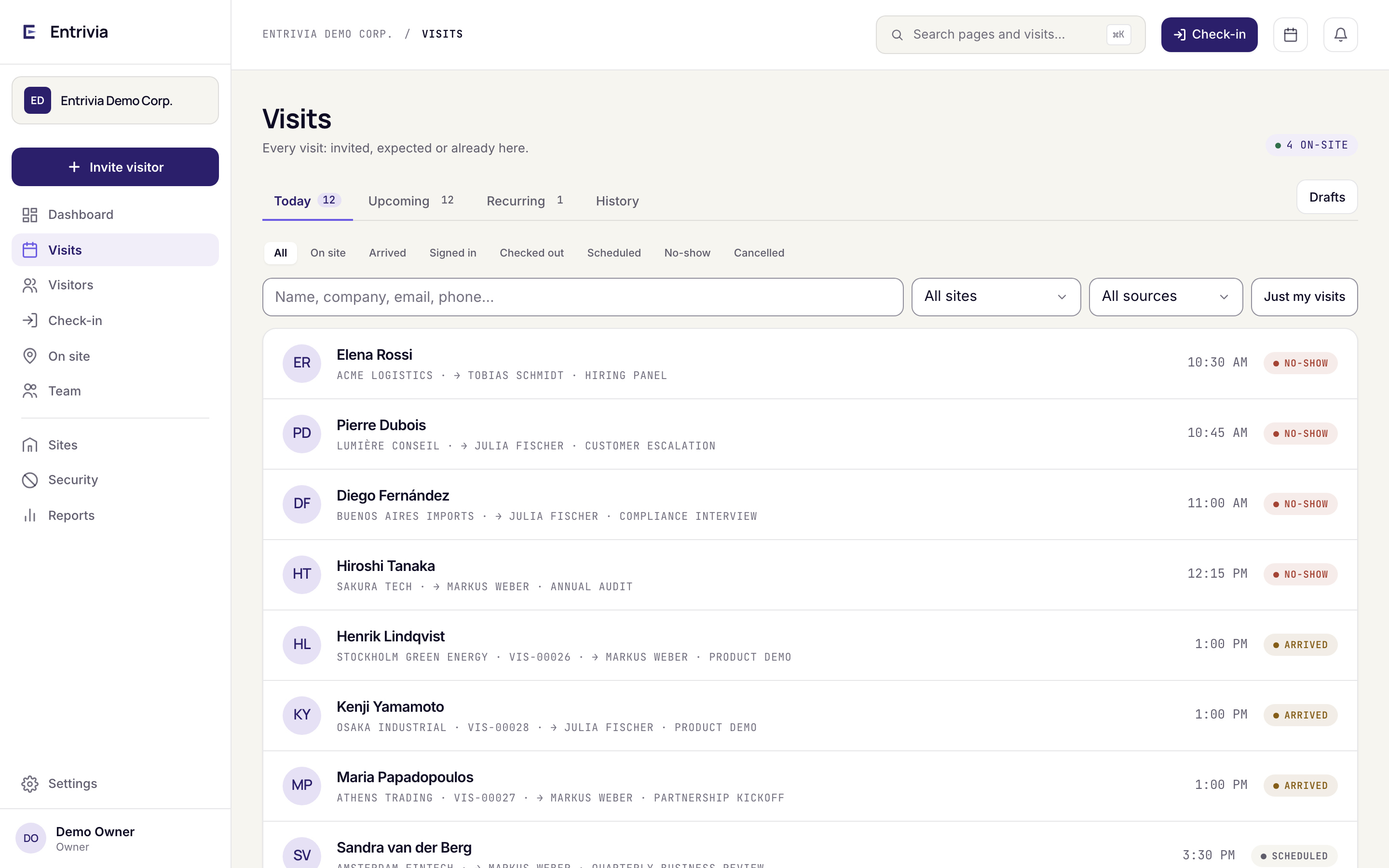
The Visits page lists every visit in tabs: Today holds the visits arriving today, walk-ins included, Upcoming the invitations for later days (see The invites list), Recurring the series and History the past visits. Owners, admins and reception see all visits at every site. Hosts see only the visits they host. Security sees Today and History at every site, without the materials shared with a visitor. Auditors can read everything but not change it, and the page opens on History for them.
Finding a visit
At the top, a counter shows how many visitors are on-site right now; it opens Today with the filter On site, which shows everyone who has arrived or signed in. On Today and History you can narrow the list:
| Filter | What it does |
|---|---|
| Status chips | All, On site, Arrived, Signed in, Checked out, Scheduled, No-show, Cancelled |
| Filter by site | One site or All sites; shown when your workspace has more than one site |
| Planned arrival | A date range, on History only |
| Filter by source | Host invite, Walk-in, Via calendar or Via your company's systems |
| Search | Visitor name, email, company, phone, badge or license plate, the host's name or the visit title |
| Just my visits | Only the visits you host |
The filters fit on two rows: search, site and source first, then the dates and Just my visits. Today keeps itself up to date: it checks for changes every minute and whenever you return to the browser tab.
History shows the newest visits first, 50 at a time; Load more at the bottom fetches the next ones. A search on History covers every earlier day and, if you can see invitations, also the next three months.
Arrived means the visitor has been identified but has no pass yet, for example because they are still signing at the desk. Signed in means their pass was issued and they are on site.
Week and month
To see the same visits by week or by month, open the Calendar.
The visit record
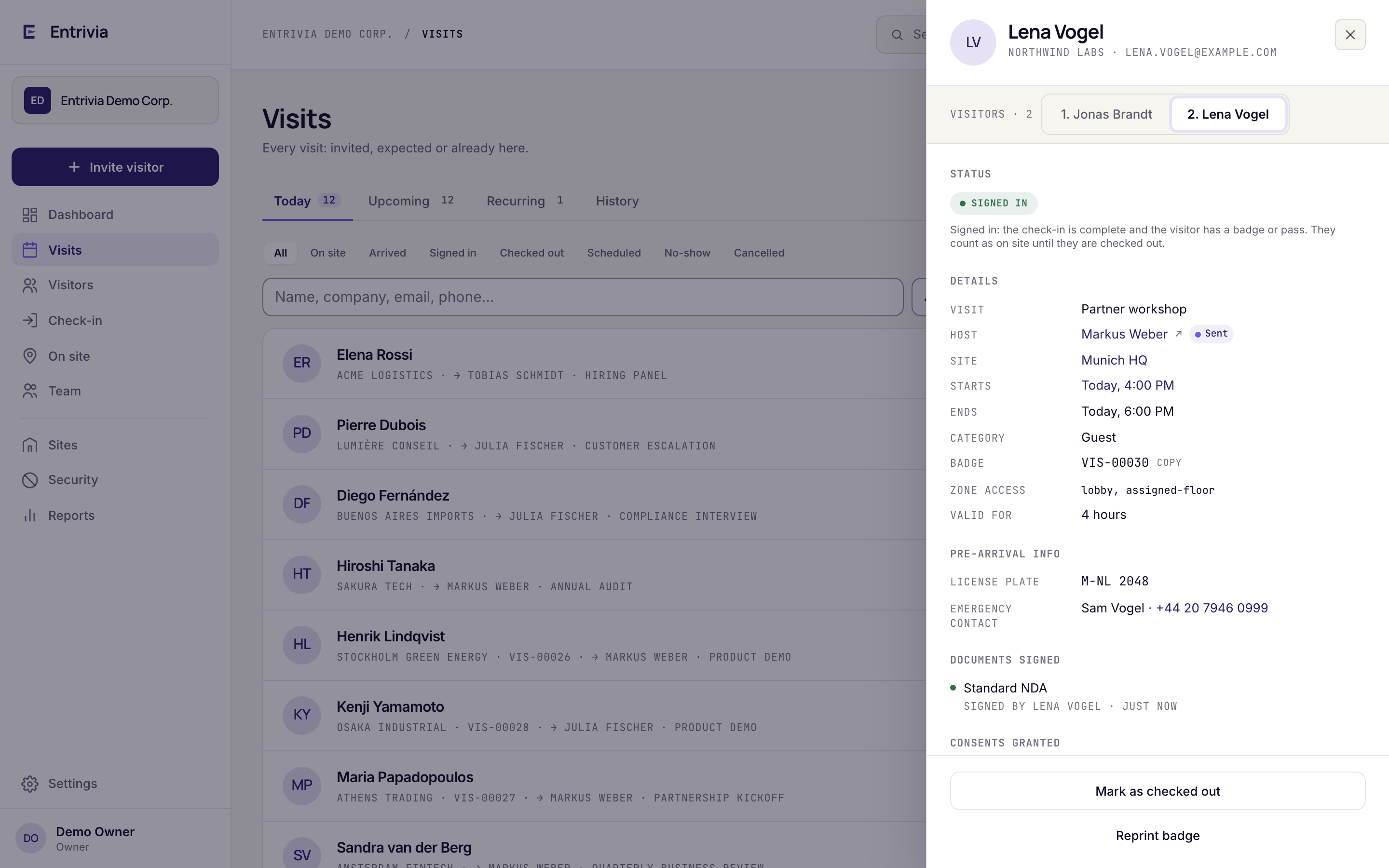
Click a row to open the visit record on the right. It collects everything about the visit in one place:
- Status, and Returning · n visits when the person has been here before.
- Details: Host, Site, Starts, Ends, Category, Photo (when it was taken), Badge, Source, Zone access and the pass: Valid until the end of an invited visit, or Valid for so many hours from check-in for a walk-in.
- Pre-arrival info such as license plate, emergency contact and accessibility note, when the visitor gave them.
- Custom fields, Materials shared, Consents granted and Documents signed.
- Notifications: whether the host was told, on which channel, and whether it worked.
- Timeline: every step of the visit in order, from invite created to checked out.
A group visit lists its visitors at the top; pick one to see their details.
Actions
Depending on the visit's state and your role, the record offers:
| Action | When to use it |
|---|---|
| Mark as checked out | The visitor has left but did not check out at the kiosk |
| Reprint badge | The printed badge was lost or damaged |
| Resume check-in | A check-in at the desk was interrupted |
| Resend invite | The visitor lost the email or the link stopped working |
| Cancel invite | The visit will not happen |
| View audit trail → | See the audit log entries for this visit |
See Checking out and Badges and printing for details.
Confidential visits
When a host marks a visit as confidential, everyone except the host sees Confidential visitor instead of the name, in the list and in the record. This only hides the name on screen; the audit log still records who visited.
Note: Checking visitors out matters. Entrivia counts someone as on site until they are checked out, and that is the list your company will rely on in an emergency.