Connecting an AI agent
How a developer lets an AI agent such as Claude Code read visits, sites and people through MCP, with an API token.
What it does
Entrivia speaks the Model Context Protocol (MCP) at the address /mcp of your installation. An AI agent that supports MCP can then answer questions such as "who is coming today?" from your workspace's data.
The agent can only read so far. It can list the visits of a day, open one visit, search visitors, list sites and zones, and look up staff. It acts as the person who created its token and sees exactly what that person may see: a host's agent sees only that host's visits.
Note: What the agent reads goes to the agent and to the language model it uses. Your company decides who may hold such a token and which model the agent may use.
Creating a token
- Open Settings → Developer. You need the Developer access permission; owners have it.
- Select Create token, give it a name, for example the agent's name.
- Tick mcp and the access the agent needs: sites:read, visits:read, visitors:read and people:read. Without mcp the token does not work for an agent at all.
- If you like, set Expires on, the day after which the token stops working, and Allowed addresses, the IP addresses or ranges the agent connects from. Requests from anywhere else are refused. Leave both empty for a token that never expires and works from anywhere.
- Select Create token and copy the token. It is shown only this once.
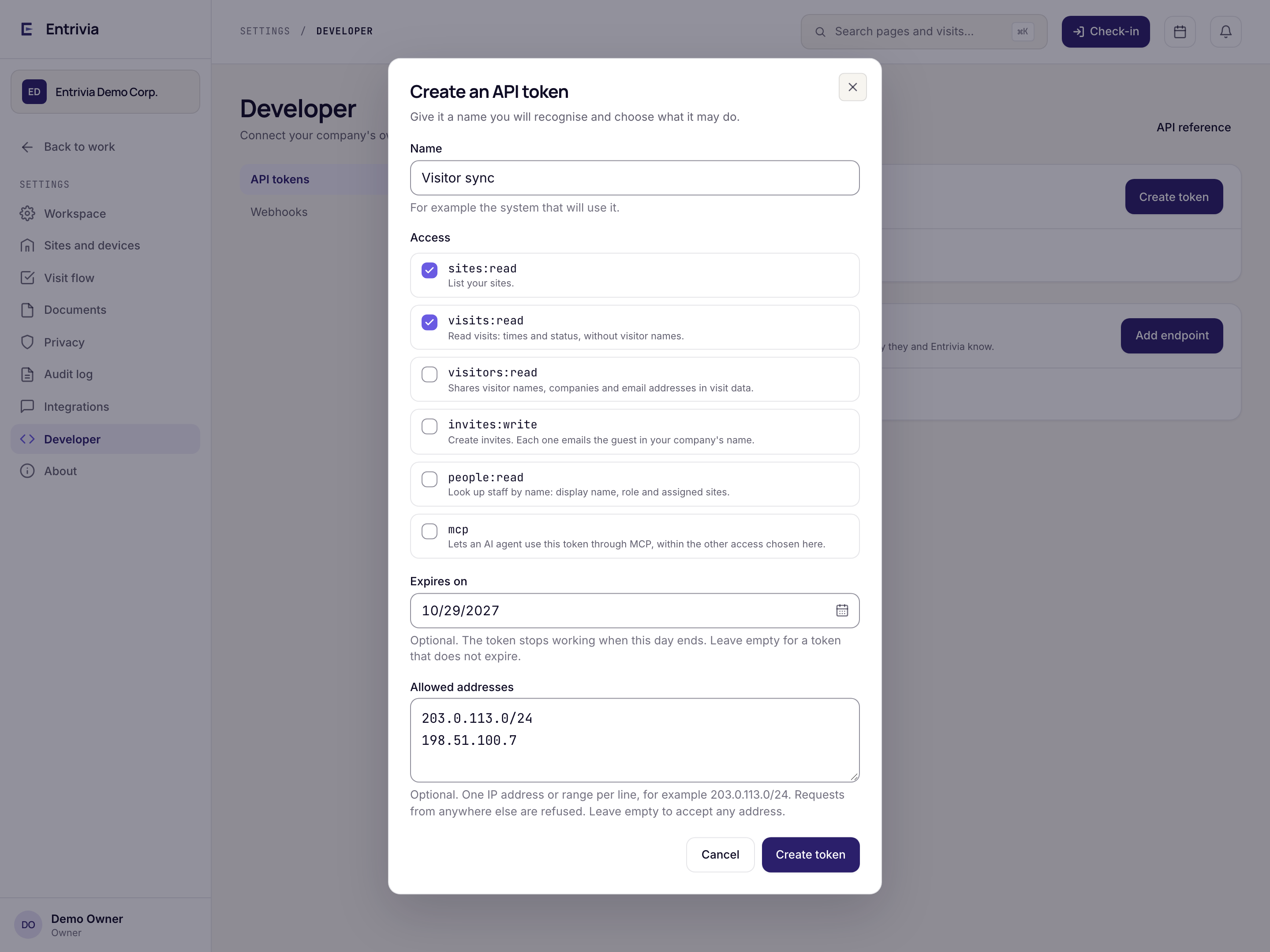
A token with visitors:read can read visitor names, so every owner is told when one is created, in the notification bell and by email.
Revoke the token under Settings → Developer when the agent no longer needs it. It stops working at once.
Connecting Claude Code
Run this in a terminal, with your installation's address and the token:
claude mcp add --transport http entrivia https://entrivia.example.com/mcp \
  --header "Authorization: Bearer entv1_..."
Then ask Claude Code "Who is coming today at our Berlin site?". Any other MCP client works the same way: the address is https://<your installation>/mcp, the transport is streamable HTTP, and the token goes in the Authorization: Bearer header.
Limits
- Each answer holds at most 25 entries; the agent asks for the next page itself.
- A token makes at most 1,000 requests an hour, shared with the REST API.
- The agent cannot create or change anything yet.