The invites list
See every invite and how far each visitor has got, resend a lost link or cancel a visit.
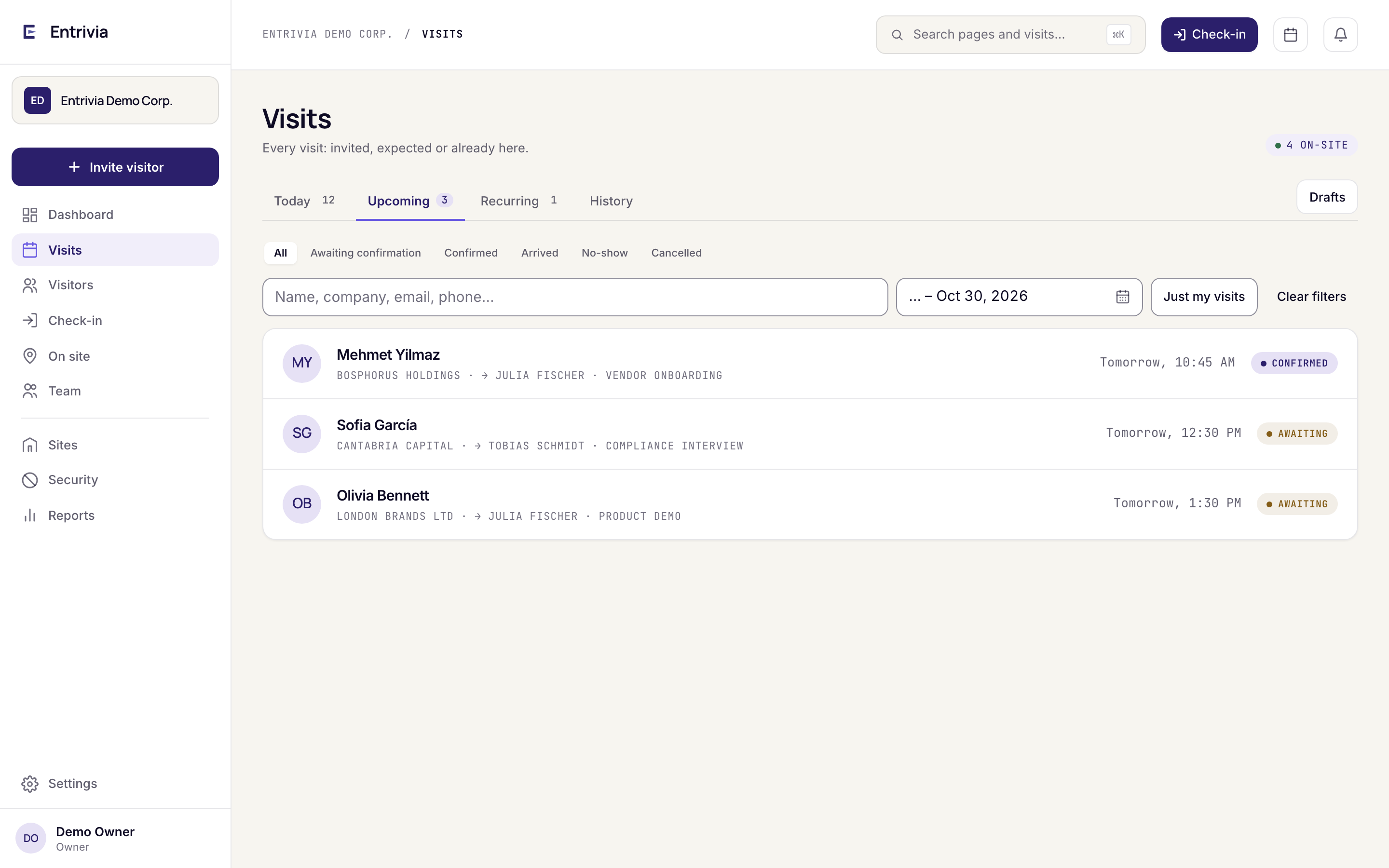
The Upcoming tab of Visits lists the invitations for the days after today, soonest first; today's visits are on the Today tab. The tab shows the next 30 days; Show later visits at the end of the list loads 30 more. The tab's label counts the visits it shows. Hosts see only the visits they host. Owners, admins, reception and auditors see all of them. Security does not get this tab.
What the chips mean
Each row carries a chip that shows where the visitor stands. An invite with several visitors is one row: it names the first visitor, its chip follows that visitor, and a chip such as +2 guests counts the others.
| Chip | Meaning |
|---|---|
| Awaiting | The invitation went out; the visitor has not finished pre-arrival yet. |
| Confirmed | The visitor finished pre-arrival on their phone. |
| Arrived | The visitor is at the desk or the kiosk. |
| Checked out | The visitor has left. |
| Declined | The visitor was turned away on arrival. |
| Cancelled | The host or an admin cancelled the invite. |
| No-show | The visitor did not arrive. |
A row can also carry Event, for an invite marked as an event, and Multi-day, for a visit that runs over several days. A recurring series shows only its next visit, with a chip such as +3 more dates that unfolds the later ones; Hide later dates folds them again. See Drafts and recurring visits.
Finding an invite
- The chips above the list filter by state: All, Awaiting confirmation, Confirmed, Arrived, No-show, Cancelled.
- The search field finds a name, company, email, phone, visit title or host.
- The date field narrows the list to a day or a range of planned arrivals. Clicking the day on a row does the same for that day.
- Just my visits shows only the visits you host.
- Clear filters resets everything.
Search, dates and Just my visits sit on one row. The list keeps itself up to date: it checks for changes every minute and whenever you return to the browser tab.
Resending or cancelling
Both actions live on the visit record. Open Visits, click the visit's row on any tab, and use the buttons in the side panel. They are offered while the visit is planned and not yet over. Owners, admins and the visit's host can use them.
- Resend invite sends a fresh email with a new link to the first visitor on the invite. The old link stops working at the same moment, so only the newest email is valid. Use it when a visitor lost the email or it landed in spam. It is refused when that visitor has no email address, has already arrived, or is waiting for a screening review.
- Cancel invite cancels every visitor who is still expected. Each of them receives an email titled "Your visit to workspace has been cancelled", naming the host and the planned time and saying that no action is needed. Their links stop working. Visitors who already arrived, left or did not show up are not touched, so a visit that is under way stays open.
Note: Editing an invite after it was sent is not available yet. To change the time or the visitors, cancel the invite and send a new one.
No-shows
A visitor who has not arrived some minutes after the visit's end is marked No-show automatically. An admin sets the number of minutes under Settings → Visit flow with Auto no-show after; an empty value turns this off. A no-show is not final: if the visitor turns up after all, reception can still check them in.