Sanctions screening
Check visitors against government sanctions lists and decide possible matches on the Screening tab of Security.
Some companies must check visitors against government sanctions lists, for example in defence, finance or export-controlled industries. Entrivia does this only when an admin connects a screening service under Settings → Integrations (see Connecting a service). StackForge's screening service is the default. A service that would process visitor details outside the EU cannot be connected. Without a connected service, nobody is screened and nothing in this article applies.
When visitors are checked
| Moment | What happens |
|---|---|
| At invitation | The invite email is held until the check is clear |
| At pre-arrival | Checked again, only if the visitor changed their details |
| At check-in | Checked again before the pass is issued |
| Daily | Upcoming visits are checked again |
Only the name, date of birth, country of residence and, if collected, an ID number are sent to the service. While screening is active, pre-arrival asks the visitor for their Country of residence, and reception's Details step offers Country of residence and Date of birth.
The visitor never learns the result. When a check finds a possible match, or cannot run, they are asked to wait at reception. Hosts never see the word "match"; they see a neutral status.
Deciding a review
Reviews are on the Screening tab of Security, for people with the Compliance permission, for owners and for auditors (who can read but not decide). Auditors also have Compliance in the rail, which opens the same tab.
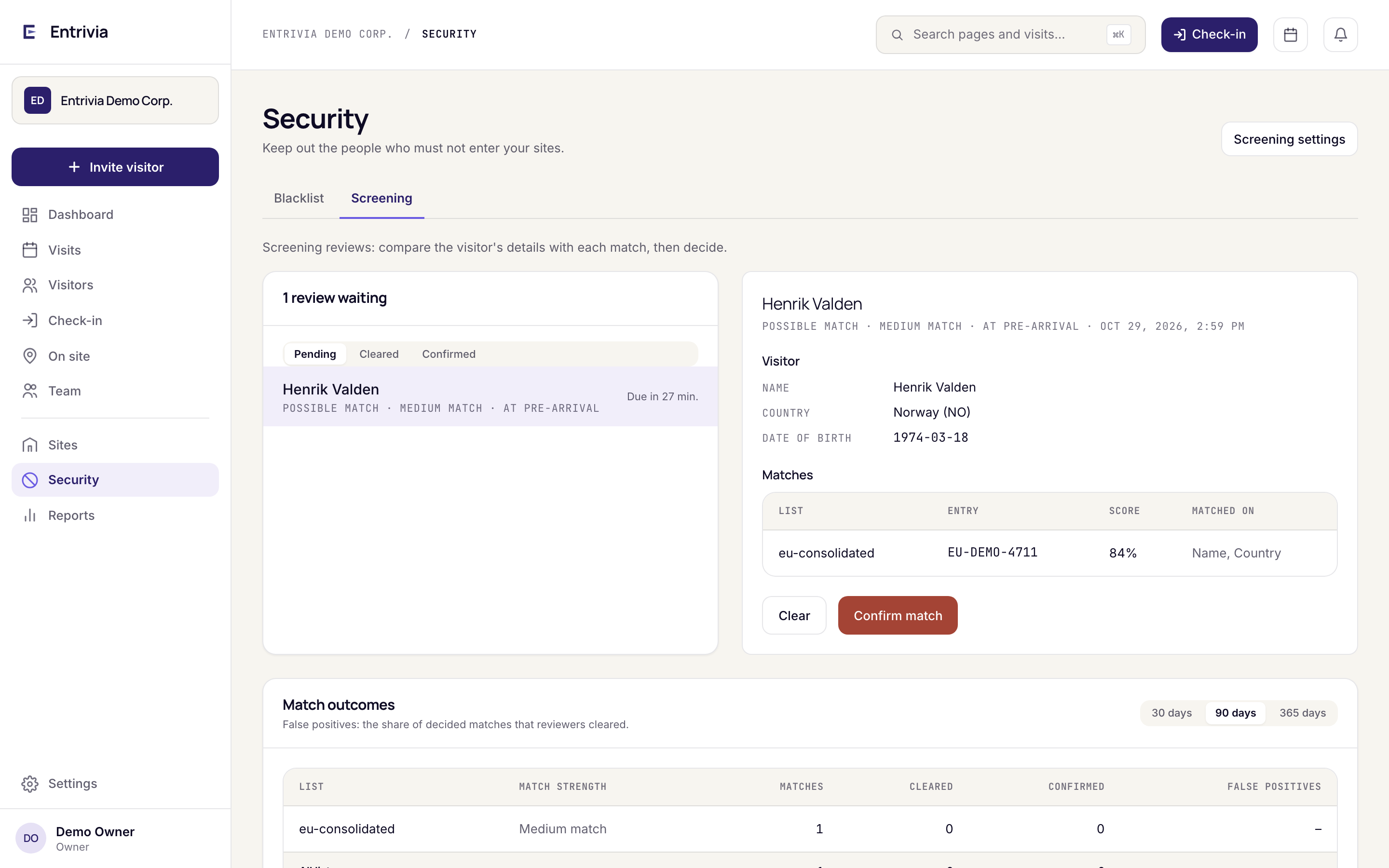
- Open a review from the Pending list. Due and Overdue show how urgent it is.
- Compare the visitor's name, country and date of birth with each match: List, Entry, Score, Matched on.
- Choose Clear if it is not the same person. The visitor can then be let in, and the pair is remembered as a false positive for 12 months.
- Or choose Confirm match. The visitor stays held and reception can turn them away. Tick Also block this person from all future visits to add a blacklist entry for this name and date of birth at every site.
- Write a Justification. It is required. Only a fingerprint of the text goes into the audit log, not the text itself.
The person who hosts or invited the visit cannot decide its review; another compliance reviewer must.
When the check could not run (service down, details missing, monthly limit reached), reception can let the visitor in with a reason, see Held visitors. A possible match can only be decided here.
Settings
The screening settings are a section of Settings → Visit flow, shown to owners and people with the Compliance permission; the Screening settings button on the Screening tab leads there. Owners, and admins with the Compliance permission, can change them.
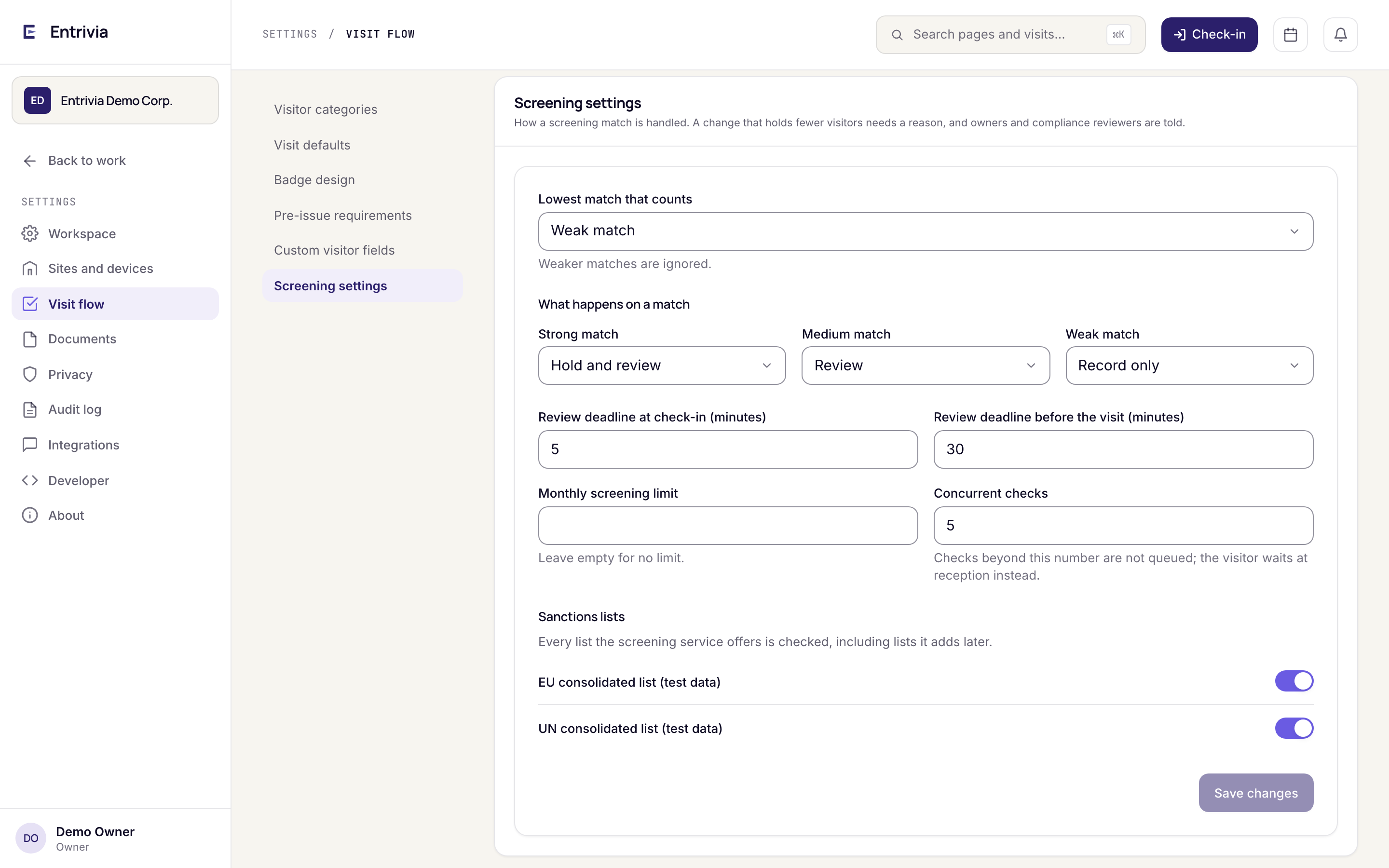
| Setting | Meaning |
|---|---|
| Lowest match that counts | Weaker matches are ignored |
| What happens on a match | Per match strength: Hold and review, Review or Record only |
| Review deadline at check-in / before the visit | Minutes a reviewer has to decide |
| Monthly screening limit | Caps the number of checks; empty means no limit |
| Concurrent checks | Checks beyond this number are not queued; the visitor waits at reception |
| Sanctions lists | One switch per list the service offers; at least one stays on. Shown only while a screening service is connected |
A change that holds fewer visitors, such as switching off a list, asks for a reason, and owners and compliance reviewers are told. The Match outcomes panel shows how many matches were cleared or confirmed per list, so you can see how often common names cause false alarms.