Visitor categories
Categories decide what a visitor is asked for, such as an NDA, a photo or an escort, so hosts do not have to remember.
A visitor category is a set of rules for one kind of visitor. When a host picks "Contractor" for a visitor on an invite, the contractor rules apply: which NDA to sign, whether a photo is needed, how long the pass is valid. Owners and admins manage categories under Settings → Visit flow, in the first card, Visitor categories.
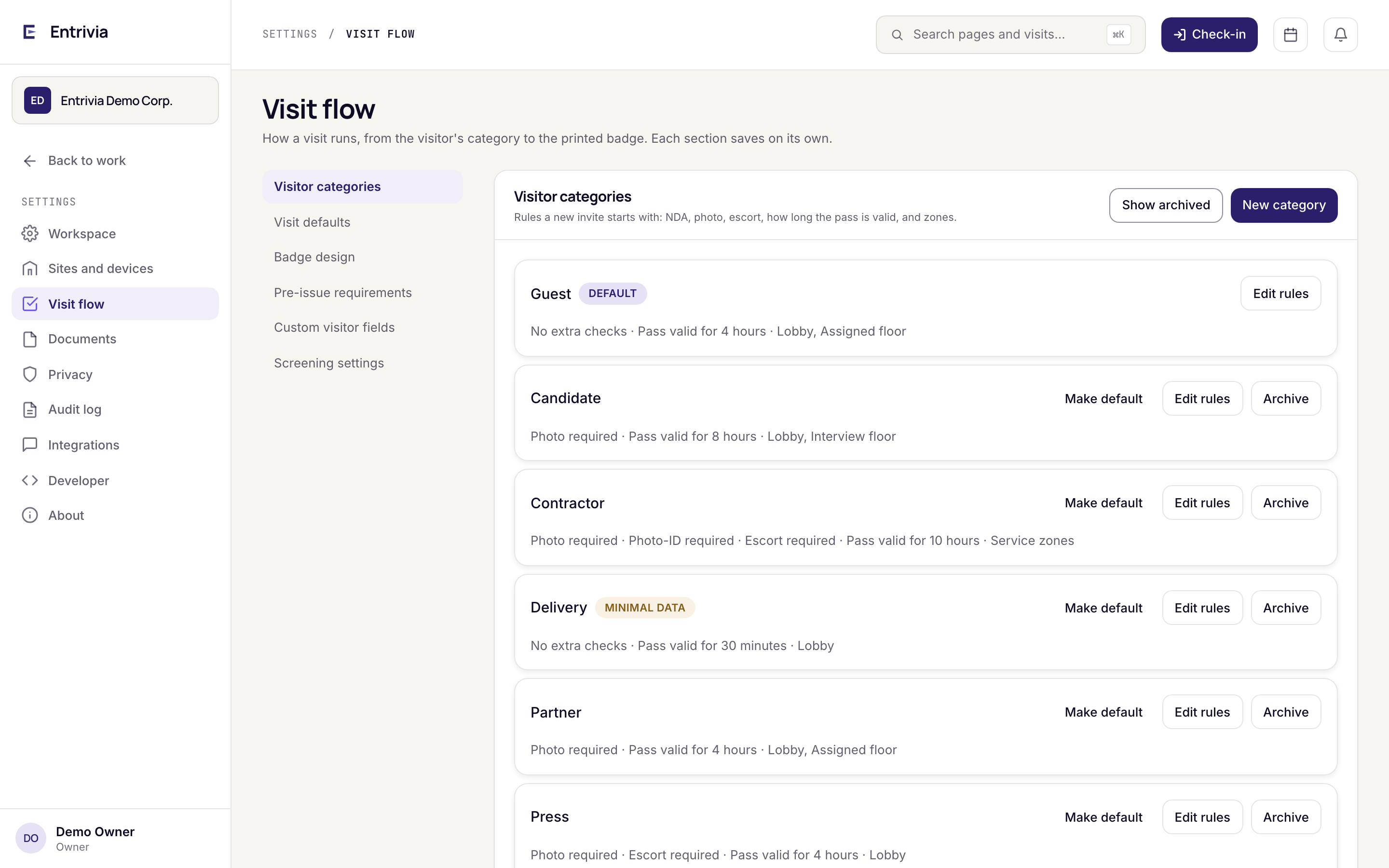
The built-in categories
Every workspace starts with seven categories. Their names appear in the reader's language (English, German or French). You can change their rules, and one of them is the default that is preselected for each visitor on the invite form.
| Category | Photo | Photo-ID | Escort | Default pass |
|---|---|---|---|---|
| Guest (default) | no | no | no | 4 hours |
| Contractor | yes | yes | yes | 10 hours |
| Vendor | yes | no | no | 2 hours |
| Candidate | yes | no | no | 8 hours |
| Partner | yes | no | no | 4 hours |
| Press | yes | no | yes | 4 hours |
| Delivery | no | no | no | 30 minutes, lobby only |
Delivery is marked Minimal data: a delivery skips the NDA, the photo and the consent questions, and the courier's pass covers the lobby only.
What a category controls
Each row sums up the rules, for example "Photo required · Pass valid for 8 hours · Lobby, Interview floor". Click Edit rules on a category to change:
- Photo required, Photo-ID required, Escort required.
- Default pass duration (minutes) and Default zone access, the areas of the site the pass covers.
- NDA template: the NDA visitors in this category sign, or none.
- Safety briefing template: overrides the site and workspace briefing.
- Default attachments: files from the attachment library that every invite in this category gets, for example the safety guide for every contractor. They are added when the invite is sent and do not have to be confirmed. The list appears once the library holds a file.
- Override pre-issue checklist for this category: the items reception ticks before issuing a badge.
- Badge layout: a layout of its own for this category.
Note: Photo-ID required is stored but has no effect yet. Capturing an identity document is planned.
Changes do not reach invites already sent
When an invite is sent, the category's rules are copied onto each visitor. If you later change the category, for example to require a new NDA, invites that are already out keep the rules they were sent with. Only new invites use the new rules. This way a visitor is never asked for something different from what the host saw when inviting.
Managing categories
| Action | What happens |
|---|---|
| Make default | This category is preselected on new invites. There is always exactly one default. |
| Archive | The category no longer appears on the invite form. Past visits keep it. The default category cannot be archived until another one is the default. |
| Show archived | Lists archived categories again. |
| New category | Adds a category of your own. Give it an ID (lowercase letters, digits, hyphens), which cannot change later, and a display name. |
A category can apply to all sites or to one site only. Set this with Site scope; a site-scoped category shows a chip with the site's name.