Visitor requests about their data
How a visitor asks to see, correct or delete their data, and what your team can do in Entrivia today.
The path a request takes
Visitors have the right to see their data, have it corrected or deleted, object to its use and withdraw a consent they gave. In Entrivia every one of these requests goes through your company:
- The visitor writes to your privacy contact. Their name and email appear on every privacy notice the visitor sees, taken from Privacy contact in Settings → Workspace.
- Your DPO or privacy team confirms the person is who they say they are. This happens outside Entrivia, by your usual process.
- Your team looks up the data and decides what the law allows or requires. Some data has to stay, for example a signed NDA that may be needed in a legal claim, or a sanctions screening record your company must keep.
- Your team answers the visitor. Entrivia never contacts the visitor about a request.
The GDPR gives you one month to answer. For complex requests you can extend this by two more months, but you must tell the visitor within the first month.
Answering a request in the portal
Owners and admins answer requests under Settings → Privacy, with two tools that work by the visitor's email address. If nothing is kept under the address, Entrivia says so; check it for typos.
Showing a visitor their data
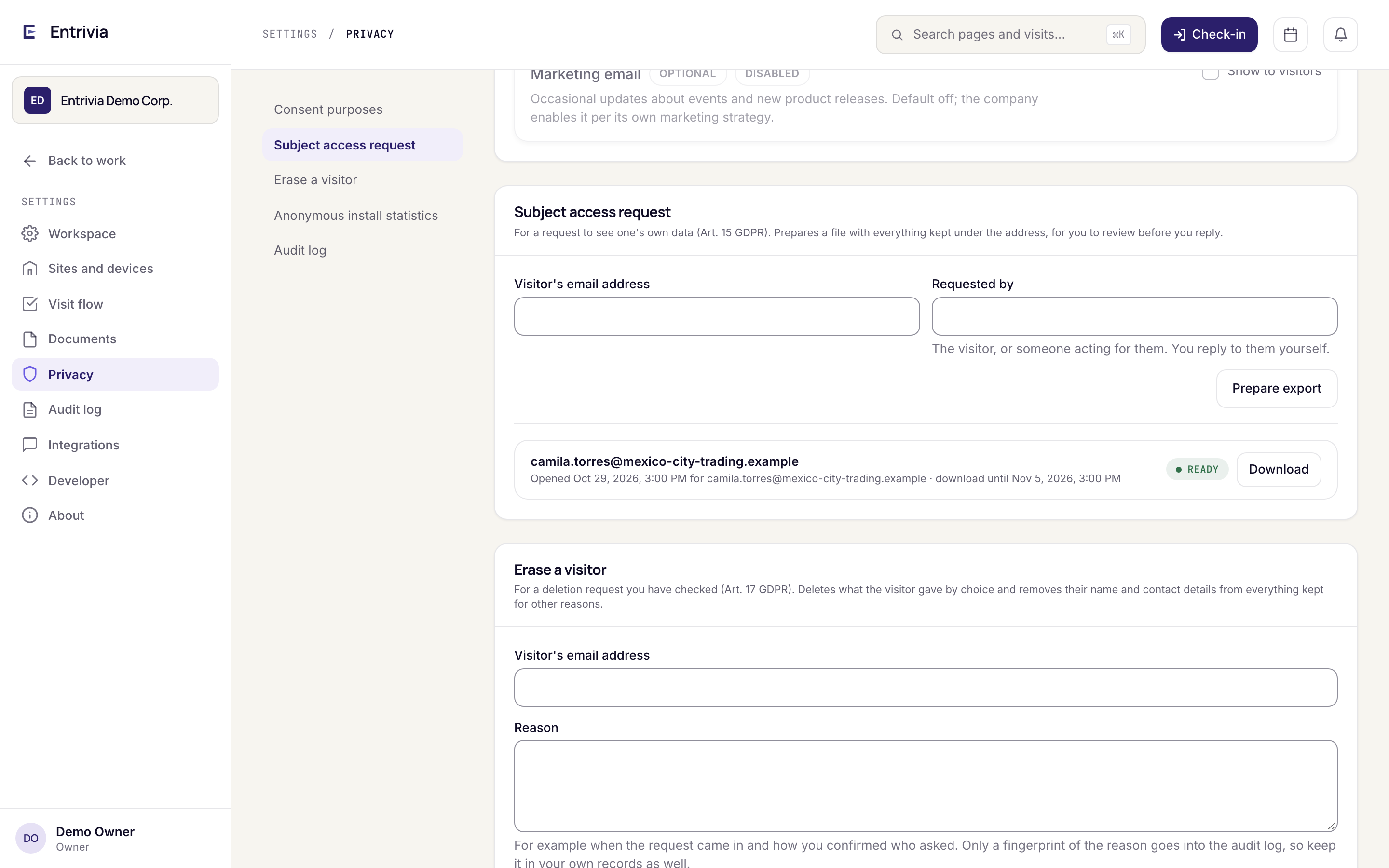
- Under Subject access request, enter the Visitor's email address, and under Requested by the address of whoever asked: the visitor, or someone acting for them.
- Click Prepare export. Entrivia collects everything it keeps under that address into one file: visits, details, consents, signed documents, emails and the audit entries about them. Blacklist entries and sanctions screening records are left out; whether to disclose them is your company's decision.
- The request appears in the list as Being prepared, then Ready. Click Download, review the file and reply to the requester yourself. Entrivia never sends the file to anyone.
The download is offered for 7 days. The file is deleted 30 days after it was ready, the record of the request after 24 months.
Erasing a visitor
- Under Erase a visitor, enter the Visitor's email address and the Reason, for example when the request came in and how you confirmed who asked. Only a fingerprint of the reason goes into the audit log, so keep the reason in your own records as well.
- Click Erase visitor. Entrivia names the address and says what goes and what stays. Confirm with Erase for good. This cannot be undone.
Entrivia deletes what the visitor gave by choice: their saved details, photos, tickets, badge images, emails and open invitations. What must be kept for another reason stays without their name and contact details: past visits, signed documents (the signature itself stays), consent records and audit entries. Blacklist entries and sanctions screening records stay as they are. Afterwards the page lists what was Deleted and what was Kept for another legal reason, without name or contact details where possible.
A visitor who is on site right now cannot be erased; check them out first. Erasing the same address again finds nothing new to delete.
Correcting data and withdrawing consent
There is no tool yet for correcting a visitor's details or withdrawing a consent in the portal. Write down what the visitor asked and ask your operator for help. Note the request in your own records of processing.
Data that is deleted anyway
Photos, tickets and files attached to a single visit are removed automatically 30 days after the visit, and so are the visitor's name and contact details on the visit itself. If a request comes in after that, an access request still finds the visit by the address, without the details. See Automatic deletion.